Estructura de Datos : Sistemas de Mensajes - Point to Point
Definiciones
- Productor de Mensajes
Es un objeto usado por un programa cliente para enviar un mensaje a un destino.
- Consumidor de Mensajes
Es un objeto usado por un programa cliente para recibir mensajes desde un destino.
- Servidor de Mensajes
Es un servidor que maneja la persistencia, vigencia, distribuicion, recuperacion y otros servicios de los mensajes.
- Destino
Es un objeto en el servidor de mensajes a traves del cual es posible enviar y recibir mensajes.
- Mensaje
Es un objeto que puede ser enviado a traves de un destino, desde un productor de mensajes a un consumidor de mensajes.
- Conexion
Es una conexion virtual entre los clientes del sistema de mensajes y el servidor del mismo. Esta conexion es utilizada para crear sesiones.
- Sesion
Es una unidad de trabajo transaccional potencial a traves de la cual puedo enviar y recibir mensajes.
Representaciones
                                              Servidor de Mensajes
*----------*    Cliente de Mensajes                                           Cliente de Mensajes   *----------*
| Mensaje  |...                                *----------------*                                ...| Mensaje  |
*----------*  .    *----------*    Conexion    |                |    Conexion    *----------*    .  *----------*
              .    |         *------------------*              *------------------*         |    .
              ..>..|....>....||.......>........||.....    .....||.......>........||...>.....|..>..
                   |         ||    Sesiones    ||    .    .    ||    Sesiones    ||         |
              ..<..|....<....||.......<........||... .    . ...||.......<........||...<.....|..<..
              .    |         *------------------*  . .    . .  *------------------*         |    .
*----------*  .    *----------*                |  *----------*  |                *----------*    .  *----------*
| Mensaje  |...                                *--|----------|--*                                ...| Mensaje  |
*----------*                                      |. .    . .|                                      *----------*
                                                  |. .    . .|
                                                  |. ..>... .|
                                                  |....<.....|
                                                  *----------*

                                                    Destino
Lecturas complementarias
Using JMS Queues
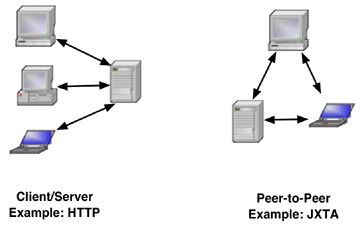
The Java Messaging Service (JMS) is a vendor-neutral set of APIs for reliable messaging between programs. In client-server computing, a client program contacts a server and requests a servi
ce. By contrast, messaging applications send messages between cooperating programs. Some programs (in so-called "peer-to-peer applications") exchange messages directly with one another (JXTA uses this model).
Examples of these two types of networking appear in the following figure.
JMS provides a middleware message broker that provides reliable,
transactional message delivery between programs.
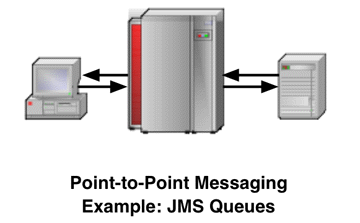
The following figure illustrates point-to-point messaging, the type of message delivery covered in this tip.
Although these figures show the message producers and consumers
as physical machines, they can also be cooperating processes
running on one or many machines.
A JMS provider is a program that implements the JMS service contracts in terms of the JMS public interfaces. The J2EE platform specification requires that platform implementations include a JMS provider.
Most people are familiar with the client-server model of messaging, where a client program contacts a server and requests a service, data, or both. The client then receives a reply, usually synchronously. By contrast, JMS provides a richer messaging model
with the following high-level features:
- Reliable message delivery. A message receiver does not have to be running when the sender sends the message. The next time the receiver is available, the message is delivered.
- Point-to-point or publish/subscribe messaging models. Message transmission may be one-to-one or one-to-many.
- Transactions. Message delivery can be made part of a distributed transaction.
- Synchronous or asynchronous delivery. A message producer may or may not wait for an acknowledgement from the receiver.
- Object-oriented messaging. Rather than sending structured data using protocols, JMS allows objects to be sent between clients.
- Legacy integration. JMS is designed to integrate with underlying third-party messaging systems.
The tip explains how to use JMS message queues to implement simple, reliable point-to-point messaging between two processes. Publish/subscribe messaging will be covered in a later edition of the Enterprise Java Technologies Tech Tips.
JMS Queue Terminology
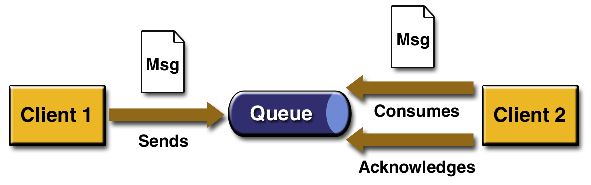
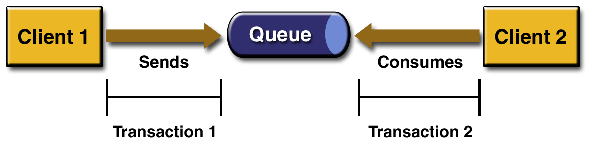
JMS uses the concept of a message queue to implement point-to-point messaging. In point-to-point messaging, there is always exactly one message producer and one message consumer. Unless the sender defines a timeout for the message, there is no time depend
ence in point-to-point messaging. A message consumer can receive a message sent at any time in the past by a message producer, even if the consumer wasn't running when the message was queued.
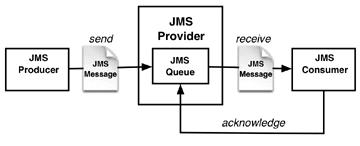
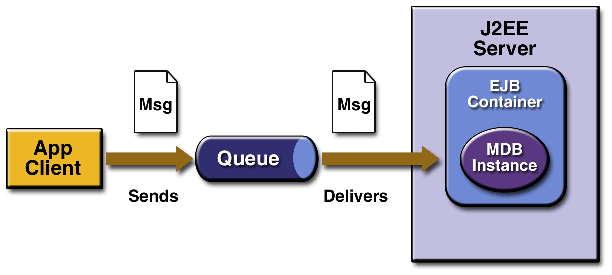
The following figure shows a point-to-point messaging scenario.
The JMS provider is a messaging server that handles message persistence, timeout, redelivery, transaction rollbacks, and other services provided by JMS. In the case of the J2EE SDK, the JMS provider is part of the j2ee server program. A message producer s
ends objects to a queue that is maintained by the JMS server. A message consumer receives messages from the queue and acknowledges their receipt.
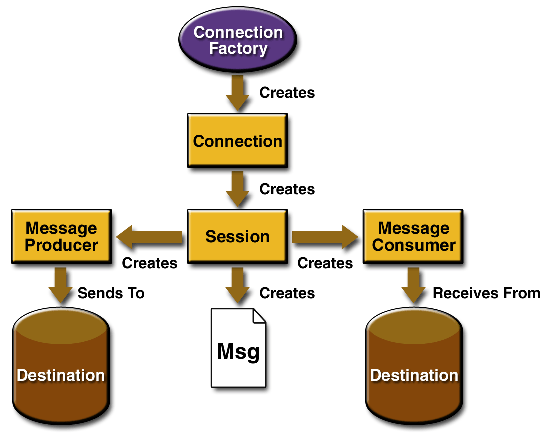
The JMS specification defines several types of objects used to send messages between processes:
- JMS administered objects. There are are two kinds of JMS administered objects: destinations and connection factories. Both are created by a system administrator using environment management tools.
- Destination. This is a server-side object through which messages may be sent and received. A JMS Queue is one type of destination.
- Connection factory. This is a server-side object that configures and creates a connection to a specific destination. A JMS connection factory for a JMS Queue is of type
QueueConnectionFactory.
- Connection. This is a virtual connection to a JMS provider (not to a destination). It is used to create sessions. A connection for accessing queues is of type
QueueConnection.
- Session. This is a potentially transactional work unit of message transmission and receipt. A session is used to create messages, message producers, and message consumers. A session used to access queues is of type
QueueSession.
- Message. This is an object that can be sent through a message destination to a message consumer. Message types vary by the sort of object being sent. For example, the sample code provided for this tip uses
TextMessage objects.
- Message producer. This is an object used by a JMS client program to send a message to a destination. The program acquires the message producer object from a session. A program can send Messages to a Queue using a message producer of type
QueueSe
nder
.
- Message consumer. This is an object used by a JMS client program to receive messages from a destination. The program acquires the message receiver object from a session. A program can receive Messages from a Queue using a message consumer of type QueueReceiver.
That's quite a few new terms. Now let's look at how to send a message. The steps below show examples taken from the sample code provided with this tip. (See the section Running the Sample Code for instructions on how to download and
run the sample code.) However, before you run the sample code, you need to configure the server (see the Configuring the Server section).
Sending Messages
The J2EE Reference Implementation comes pre-configured with a queue connection factory (called QueueConnectionFactory) and a queue (called jms/Queue). If you are using a JMS server other than the Reference Implementation, or if y
ou want to experiment with changing the names of the connection queue factory and/or the queue, see the section Configuring the Server.
Here are the steps in sending a Message through a JMS queue. Code snippets from the sample program, TestQueue, illustrate the steps.
- Get a reference to a
QueueConnectionFactory by looking it up by name with JNDI:
protected static String qfactoryName =
   "jms/queue/TechTipsQueueConnectionFactory";
...
try {
// Get JNDI context
InitialContext ctx = new InitialContext();
// Get connection factory
QueueConnectionFactory qcf =
   (QueueConnectionFactory)ctx.lookup(qfactoryName);
- Get a
QueueConnection from the QueueConnectionFactory, and get a QueueSession from the connection. Look up the queue by name in JNDI:
 // Get a connection to the queue
 qc = qcf.createQueueConnection();
 // Get a session from the connection
 QueueSession qs = qc.createQueueSession(
     false, Session.AUTO_ACKNOWLEDGE);
// Get a queue
Queue q = (Queue)ctx.lookup(queueName);
- Use the
QueueSession to create a QueueSender, passing the Queue as an argument. (The QueueSender is an association between a QueueSession and a particular queue.):
// Use the session to create a QueueSender
// and a TextMessage.
QueueSender qsnd = qs.createSender(q);
The QueueSender can now be used to send messages to the Queue.
-
Create Message objects (subclasses of type Message), and use the QueueSender's send method to send them to the destination. The sample program acquires a TextMessage object from the Se
ssion. It then packages each of the program arguments into the TextMessage, and sends it to the queue using the QueueSender. Notice that the same TextMessage can be used multiple times.
TextMessage tm = qs.createTextMessage();

// For each argument (after the first),
// send the argument string as a text message.
for (int i = 2; i < args.length; i++) {
    tm.setText(args[i]);
    qsnd.send(tm);
}
- Close the
QueueConnection. It's good practice to close the connection in the finally clause of a try/finally block. This step is important: forgetting to close QueueConnections can cause resource leaks on the server:
} finally {
    if (qc != null) {
        qc.close();
    }
}
To send a message to a message queue, use the TestQueue program (in the default package) with the argument "send", for example:
$ java TestQueue send jms/queue/MyTestQueue a b c d
Java(TM) Message Service 1.0.2 Reference
Implementation (build b14)
Sent: 'a'
Sent: 'b'
Sent: 'c'
Sent: 'd'
Receiving Messages
The TestQueue program follows these steps for receiving a
message:
- and 2. The first two steps of receiving a message from a queue are identical to those for sending: look up the connection factory, get a
QueueConnection and QueueSession, and look up the Queue.
- Get a
QueueReceiver from the QueueSession:
QueueReceiver qrcv = qs.createReceiver(q);
- Receive the message from the
Queue. The sample program enters a loop where it receives messages from the queue and prints them to standard output.
qc.start();
Message m = qrcv.receive(10000);
while (m != null) {
    if (m instanceof TextMessage) {
        TextMessage tm = (TextMessage)m;
        System.out.println("Received text: '" +
                           tm.getText() + "'");
    } else {
        System.out.println("Received a " +
                        m.getClass().getName());
    }
    m = qrcv.receive(100);
} finally {
   if (qc != null) {
       qc.close();
    }
}
The call to the QueueConnection's start method tells the connection to begin receiving messages. The QueueReceiver receive method takes an argument of the number of milliseconds to wait for a message to arrive. If no message is d
elivered within the timeout value, the method returns null. The program reads and prints received messages until the message queue remains empty for 100 milliseconds. A finally clause at the end of the try/finally block closes the QueueConnection as in the previous example.
To receive the messages in the message queue, use the TestQueue program with the argument "recv", for example:
$ java TestQueue recv jms/queue/MyTestQueue
Java(TM) Message Service 1.0.2 Reference
Implementation (build b14)
Received text: 'a'
Received text: 'b'
Received text: 'c'
Received text: 'd'
Configuring the Server
If you are not using the Reference Implementation, or if you want to change the queue and/or queue connection factory names, you need to configure the JMS provider using the platform's administration tools. After a queue or connection factory is created,
it remains in the server installation, and survives server restarts. Some platform implementations might provide extension APIs for clients to create destinations and connection factories programmatically.
The tool for creating administered objects in the J2EE SDK is j2eeadmin. To configure the server:
- Start the application server.
- Create a message queue, giving it a JNDI name. (Do this only once.) To create a new message queue in the J2EE SDK, first decide on a name for your message queue. It can be convenient for administration purposes to choose a name that indicates that the
queue is used by JMS, for example,
jms/MyTestQueue. Then execute the command:
j2eeadmin -addJmsDestination <queuename> queue

Replace <queuename> with the actual name of the message queue.
- The connection factory name
QueueConnectionFactory is hard-wired into the sample program, so to tell the program to use a different connection factory name, you have to change the source code and recompile. For example, in TestQueue
.java:
// Change this variable's value to change the
// connection factory name
protected static String qfactoryName =
    "QueueConnectionFactory"
After you recompile, use j2eeadmin (or your server's tool) to create a connection factory, giving it a JNDI name, like this:
j2eeadmin -addJmsFactory jms/MyQueueConnectionFactory
To list connection factories, use:
j2eeadmin -listJmsFactory
and to list destinations, use:
j2eeadmin -listJmsDestination
For a platforms other than the J2EE SDK, use your J2EE product's
deployment tools to create the required message queue and
connection factory on your platform.
Running the Sample Code
Download the sample archive for these tips. The JAR file contains the complete source code for the sample program, both as a Java program file and formatted as HTML. You can use the c
ommand jar xvf ttmar2003.jar to extract the contents of the sample jar into your working directory. Be sure the J2EE server is running before running the sample program.
Run the sample program several times. Try sending several batches of messages without receiving, and examine the order of the output.
The sample program provides a starting place for you to experiment with JMS queues. Explore the APIs of the JMS interfaces used. For example, change the program to use the three different forms of receive. Explore transactional message delivery, or try se
nding Message objects of various types. JMS has many features, and using it skillfully can improve your application designs.
For further information about JMS, see the Java Message Service Tutorial.